Viewing Failed Memory Assertions
To view information about all failed memory assertion, the command  Show Failed Memory Assertions can be used. This command will bring up a dialog box presenting information about the failed assertions.
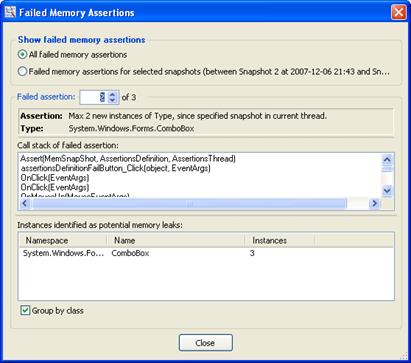
Show failed memory assertions
This area is used to select the failed memory assertions to show. To show all memory assertions, select the All failed memory assertions option; to show only memory assertions that have failed between the selected snapshot and the comparison snapshot, select Failed memory assertions for selected snapshots.
Failed assertion
Information about the failed assertions is presented here. The text box and up-down field can be used to select the assertion to show.
At the top of the failed assertions group, information about the assertion method is presented. Below the assertion information, the call stack of the assertion is presented.
At the bottom of the group box, a list is used to present the instances that have been identified as potential memory leaks. If the Group by class check box is checked, the instances are grouped and the number of instances per class is presented. Otherwise, all instances are presented in the list.